
The Adaptive Drumset Groove Generator User Guide
Online Edition - Get the full version by purchasing the generator bundle!
Introduction
This tool is built around a simple idea: progress in drumming improves when practice is specific, repeatable, and adaptable. The challenge is not a lack of material. It is having the right material at the right time, aimed directly at the skill being developed. The Adaptive Drumset Groove Generator exists to solve that problem by giving you a controlled way to create patterns that match your exact needs.
Instead of relying on a fixed collection of exercises, this system allows you to define what you want to work on and generate patterns that reflect those choices. You can focus on coordination, timing, subdivision, orchestration, or any combination of skills, then adjust the difficulty as needed. The result is a flexible approach that keeps practice and instruction aligned with clear goals.
For educators, this provides a practical way to deliver targeted instruction without constantly rewriting material. For students, it creates a structured environment that supports consistent improvement. For performers and writers, it offers a reliable method for developing ideas and exploring new possibilities. In each case, the goal is the same: remove guesswork and replace it with a system that produces focused, usable results.
This book will show you how to use that system effectively. You will learn how to make intentional selections, generate patterns that serve a purpose, and apply them in a way that leads to measurable progress. Paired with the Groove Generator Tool itself, you’ll have a complete framework for creating, practicing, and teaching with clarity and efficiency.
Table of Contents
Clear, step-by-step instructions for using the Groove Generator effectively.
1: What This Is & Who It’s For
04: How Groove Generation Works (Purchase the Bundle for this chapter)
6: Step-by-Step Workflows (Purchase the Bundle for this chapter)
7: Understanding the Output (Purchase the Bundle for this chapter)
8: Practice Applications (Purchase the Bundle for this chapter)
9: Customization & Advanced Options (Purchase the Bundle for this chapter)
10: Common Use Cases (Purchase the Bundle for this chapter)
11: Troubleshooting (Purchase the Bundle for this chapter)
12: Frequently Asked Questions
13: Tips From Real Use (Purchase the Bundle for this chapter)
16: Next Steps & How to Level Up (Purchase the Bundle for this chapter)
01: What This Is & Who It’s For.
How the Adaptive Drumset Groove Generator Works:
At its core, the Adaptive Drumset Groove Generator produces rhythm patterns by working within a simple 16th note grid. Each subdivision is evaluated independently and assigned either an active note or a rest. When no additional settings are applied, this process is completely random, with each 16th note having an equal chance of being turned on or off. This creates highly unpredictable results, which can be useful for exploration, but often produces patterns that are not musically practical or structurally consistent.
The strength of the system comes from how those results are refined. Rather than relying on pure randomness, you can apply a series of selectable constraints that shape the output. These settings guide the generator toward more intentional musical outcomes by limiting how notes are placed, how patterns are distributed, and how different rhythmic ideas interact within the grid. As more constraints are applied, the results become increasingly focused and aligned with real musical application.
This is where the educational value becomes clear. Each selectable option represents a specific rhythmic or technical concept. By choosing combinations of these options, you are no longer just generating random grooves. You are defining the boundaries of a musical exercise. This allows you to target specific skills such as coordination, timing consistency, subdivision control, or pattern recognition, all while still introducing variation within those parameters.
For educators, this creates a powerful way to build lessons around specific objectives. Instead of writing individual exercises one by one, you can establish the skill focus first, then generate multiple groove variations that all reinforce that same concept. This keeps the lesson structured while still exposing students to a wide range of examples within the same technical framework. It also allows for real-time adjustment, making it easy to increase or decrease difficulty based on student response.
As you refine your selections, the generator becomes less about randomness and more about controlled variation. You are essentially designing the rules of the exercise, and the system handles the creative output. This balance between structure and unpredictability is what makes it effective for both teaching and practice. It provides consistency without repetition, and variety without losing direction.
The end result is a tool that supports intentional learning. Whether you are building a full lesson, isolating a specific skill, or exploring new rhythmic ideas, the Adaptive Drumset Groove Generator allows you to stay focused on the goal while continuously producing usable, relevant material.
Who the Groove Generator Is For:
The Adaptive Drumset Groove Generator is designed to serve three primary types of users, each with a different goal but a shared need: generating focused, usable drum patterns quickly and consistently.
First, the percussion educator or drum teacher. In a lesson setting, this user can select specific checkboxes that correspond to the exact skills a student needs to develop. These selections define the parameters of the exercise. Once set, the generator produces grooves that stay within those boundaries, allowing the lesson content to effectively “write itself” around the chosen focus. With a single click, new variations can be generated instantly, giving the teacher a continuous stream of targeted material that reinforces the same concept from multiple angles. This makes it possible to adjust in real time based on student performance while maintaining a clear instructional direction.
Second, the drum student. For individual practice, the generator becomes a structured self-guided tool. Students can choose specific elements they want to improve and isolate those areas through focused groove generation. This allows them to repeatedly encounter and refine particular skills in a controlled environment, rather than relying on random practice or memorization of static exercises. It creates a feedback loop where selection, repetition, and adjustment all work together to support steady improvement.
Third, the composer or drumset artist. In this context, the generator functions as a creative support tool for writing and arranging. By selecting specific rhythmic or stylistic elements, the user can quickly explore groove options that align with a musical idea or composition. Instead of starting from a blank page, they are presented with multiple viable rhythmic interpretations that can support or enhance a musical phrase. This makes it easier to evaluate options, refine direction, and arrive at grooves that serve the music effectively.
Across all three use cases, the purpose is the same: reduce friction between intention and execution. Whether teaching, practicing, or composing, the Adaptive Drumset Groove Generator provides a structured way to generate relevant, adaptable drum patterns in real time.
What Problems This Solves:
The Adaptive Drumset Groove Generator is designed to remove the most common barriers that slow down progress in teaching, practicing, and creating drum music. Instead of spending time building exercises from scratch or searching for ideas that may or may not fit your needs, you can generate focused material instantly based on specific, intentional choices.
For educators, it reduces lesson planning time while increasing precision. You can quickly build structured material around the exact skills you want to address, then adjust and regenerate as needed without breaking the flow of the lesson. This makes it easier to maintain consistency, adapt on the fly, and keep students working within a clear developmental path.
For students, it provides structure without limitation. Practice becomes more targeted and efficient, helping eliminate wasted time and uncertainty about what to work on. Instead of repeating generic exercises, students can consistently engage with material that directly supports their current goals.
For composers and performers, it helps overcome creative blocks by generating usable rhythmic ideas instantly. When inspiration is limited or direction is unclear, the system provides multiple starting points that can be shaped into musical ideas rather than forcing a blank-page workflow.
Across all use cases, the core benefit is speed and focus. What normally takes planning, searching, or experimentation is reduced to a simple selection process followed by instant results. It removes friction between intention and execution and replaces it with immediate, targeted output that you can use right away.
02: Getting Started.
Getting Started:
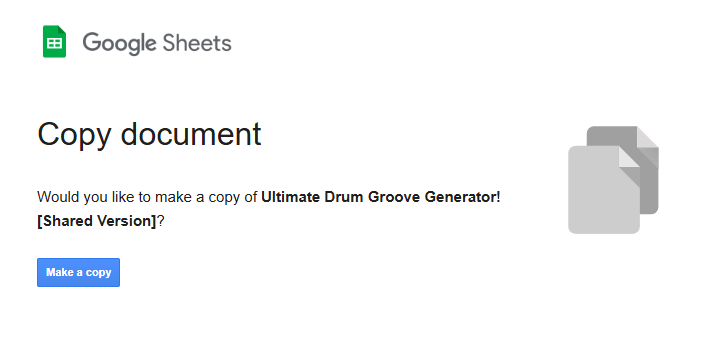
To begin, open the downloaded ZIP file and click the generator link. Your web browser will open and you will see a button labeled “Make a copy.” Click this to create your own working version of the Groove Generator. You may be prompted to sign into your Google account if you are not already signed in.
Once your copy is created, you will be taken directly to the main generator page. From here, you have two options. You can scroll to the bottom and select a level tab (1 through 6) to instantly generate grooves based on a pre-organized skill progression. This is the fastest way to start exploring the system without making detailed selections. Alternatively, you can stay on the main page and begin customizing your own results by selecting specific checkbox options based on the skills you want to focus on.
Each checkbox you select or deselect immediately changes the output. Every adjustment generates a new groove that follows your chosen parameters, allowing you to refine the exercise in real time. Once your selections are set, you can continue generating new variations simply by clicking the large red button.
Each level is designed as a starting framework to guide you into the system, not a limitation. You are encouraged to combine or modify checkbox selections across levels as needed to target specific skills and build more personalized practice material.
When you are ready, experiment freely. The generator is designed to respond instantly to your choices, giving you a continuous stream of new grooves tailored to your direction.
Example Workflow:
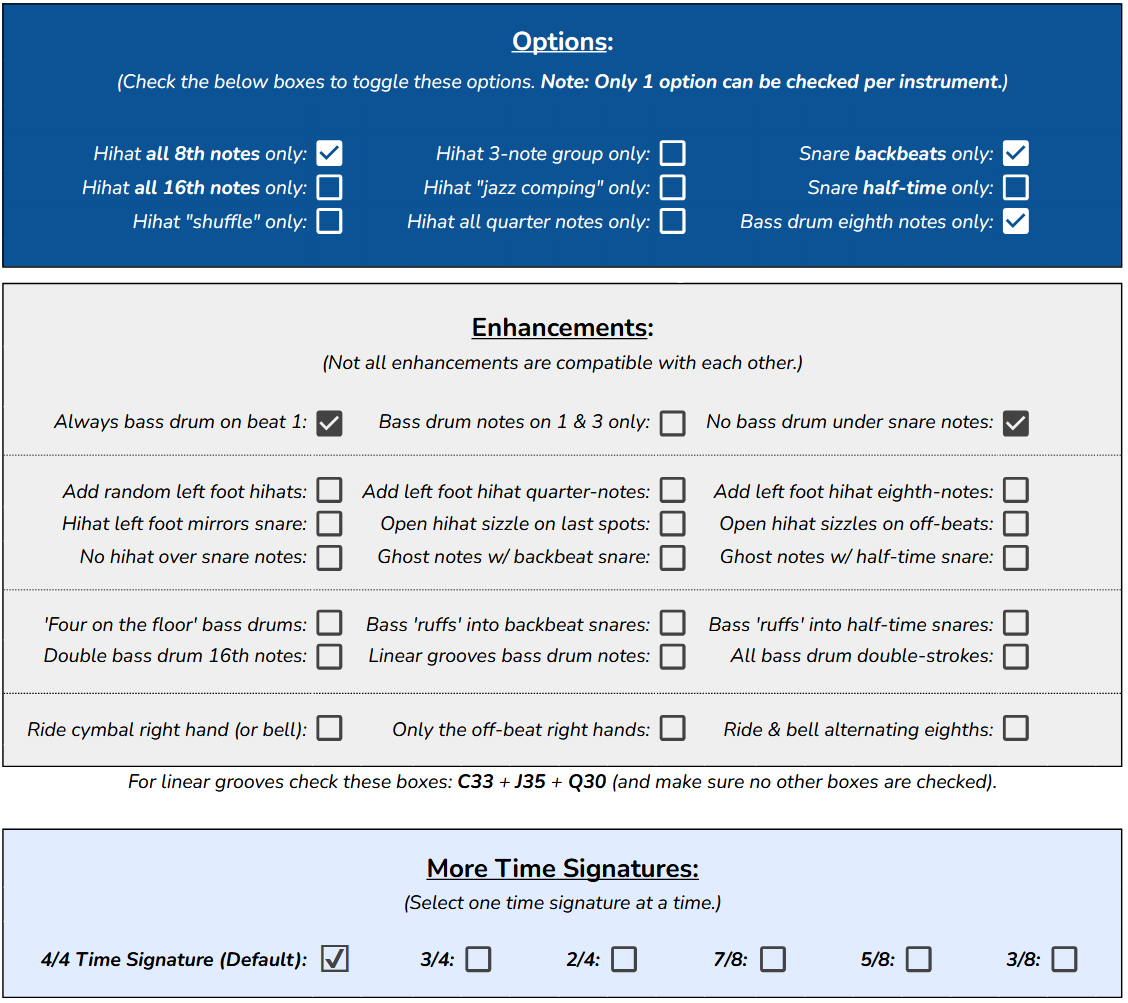
An example workflow might look like this. A student wants to focus on 16th note hi-hat grooves with standard backbeats on the snare drum. In the OPTIONS section, all checkboxes are turned off except for “Snare backbeats only” and “Hi-hat all 16th notes only.” This immediately defines the core structure of the groove and ensures the output stays centered on that specific coordination concept.
By default, two ENHANCEMENT options are already selected: “Always bass drum on beat 1” and “No bass drum under snare notes.” These settings help stabilize the groove and maintain a more realistic rhythmic foundation. In this example, you can choose to leave them on or adjust them depending on the lesson focus.
Because the hi-hat is playing continuous 16th notes, it is also recommended to enable an additional ENHANCEMENT option such as “No hi-hat over snare notes.” This helps clean up the texture and reinforces more common stylistic conventions found in real-world drum grooves.
Once these selections are set, simply click the red generate button. A new groove will appear instantly, with bass drum placement adapting each time while staying within the defined rules. This allows you to reinforce the same core concept while still exposing the student to variation and unpredictability.
By default, the generator operates in 4/4 time. However, if you want to shorten or extend the phrase, you can easily select different time signatures at the bottom of the interface to immediately change the rhythmic structure.
Quick Start Note:
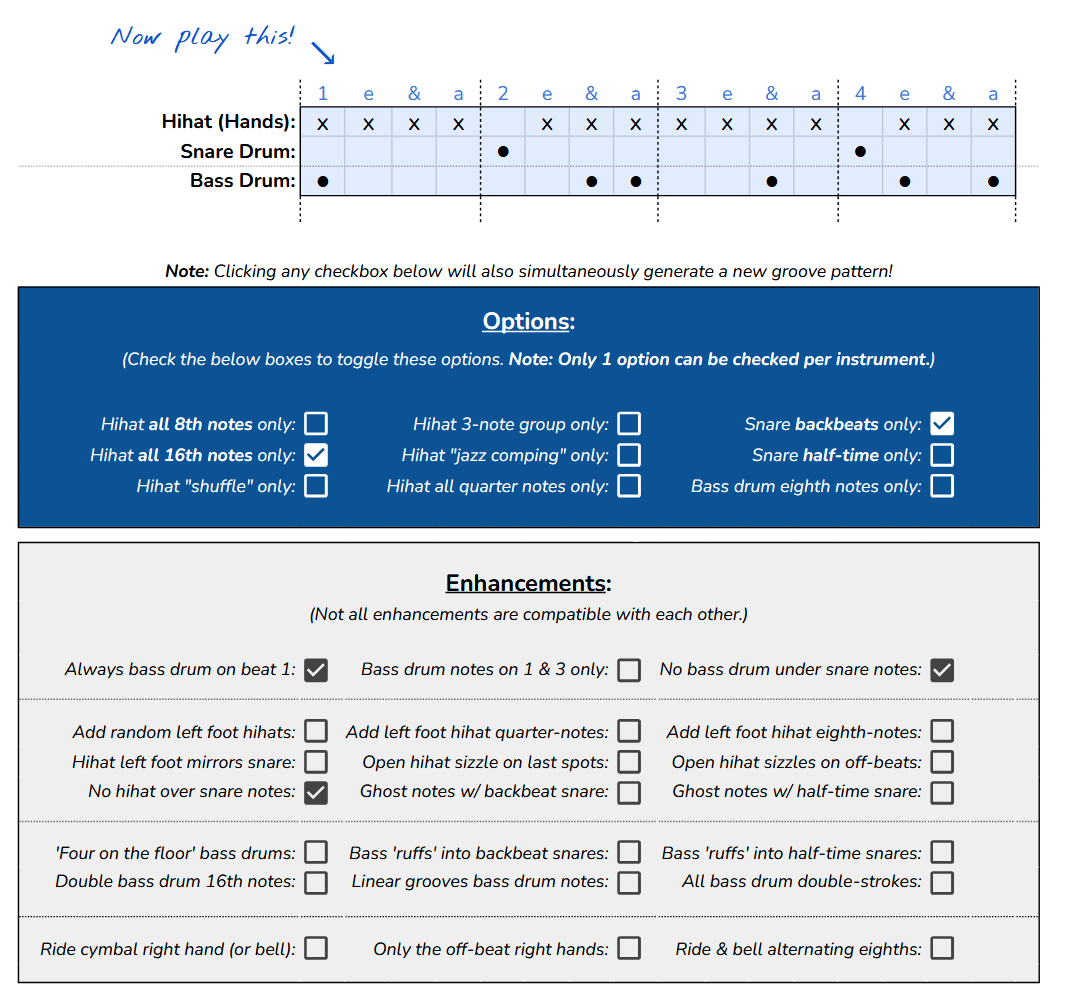
If you do nothing else when starting, the system defaults to standard 8th note grooves. This means you can open the generator and immediately begin clicking the red generate button to create new grooves without adjusting any settings at all.
This is often the best way to get familiar with how the system responds. You can explore the output first, then gradually start enabling checkboxes once you understand how each selection changes the groove in real time.
03: Interface Overview.
What Each Section of the Tool Does:
The most prominent element of the Groove Generator is the large red button. When clicked, it generates a new groove in the measure below based on the rules you have selected in the checkboxes throughout the interface. Each click produces a fresh variation while still respecting your chosen constraints.

Directly beneath the red button is the groove display itself. This is the working measure where all generated patterns appear. Each square represents a 16th note, organized into four groups of four to represent each beat in 4/4 time. To make reading easier, beat counts are labeled above the grid, helping you visually track placement and structure in real time.

When certain options are enabled, an additional fourth line may appear at the bottom of the measure. This is used to represent extended or additional layers depending on the selected settings, giving more depth to the generated groove when needed.
Below the measure, the system is divided into three main sections: OPTIONS, ENHANCEMENTS, and MORE TIME SIGNATURES.
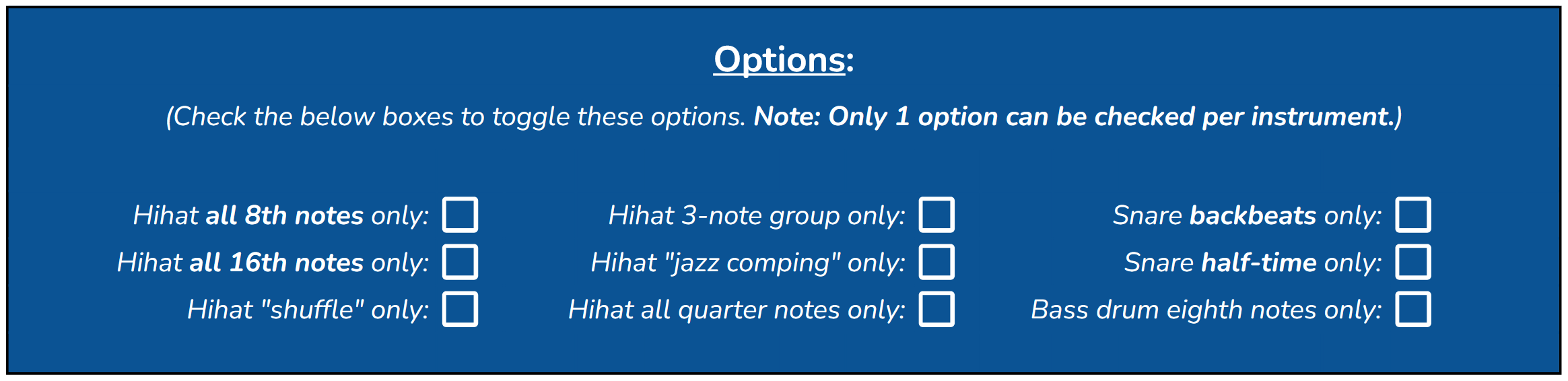
The OPTIONS section is where the core structure of the groove is defined. This includes fundamental hi-hat, snare, and bass drum patterns. In this section, you should generally select one option per instrument group. These choices establish the foundation of the groove before any additional variation is applied. For detailed explanations of each option, refer to the CORE FEATURES section of this user guide.
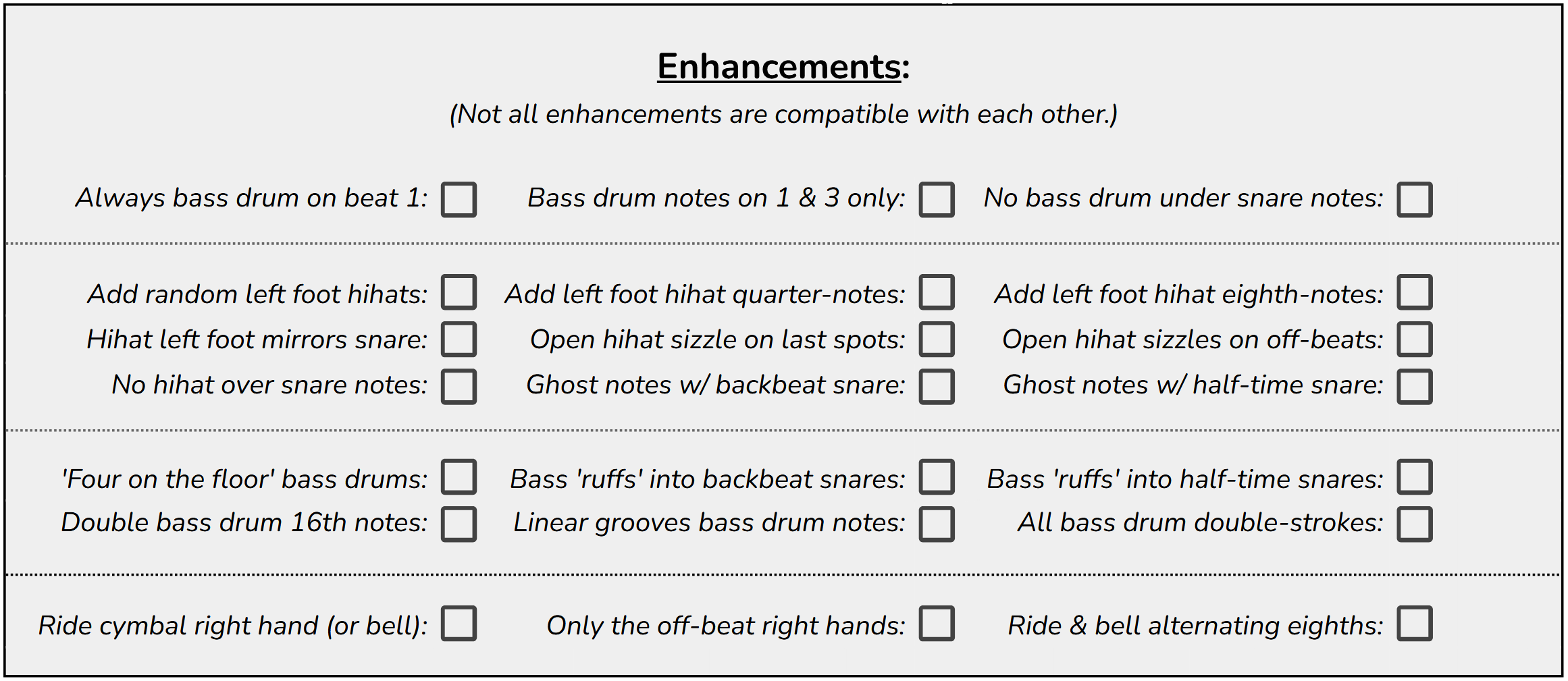
The ENHANCEMENTS section adds additional musical detail on top of the OPTIONS selections. These settings refine and expand the groove by introducing stylistic or technical variations. While these are also organized by instrument, you can select multiple options within a group as long as they do not conflict with one another. For example, selecting multiple ride cymbal options can create layered or alternating articulation patterns such as off-beat bell hits.
The MORE TIME SIGNATURES section allows you to change the length and feel of the measure. The default setting is 4/4, which is selected automatically. Only one time signature can be active at a time. Selecting a different option will automatically disable the previous selection. To return to 4/4, simply deselect any alternate time signature options.

Together, these three sections allow you to move from a simple foundational groove to a highly customized and targeted exercise with precision and control.
Terminology and Interpretation:
Most terminology used in the Groove Generator follows standard drumset language, though in some cases it is shortened for clarity and space within the interface. This is intentional and is meant to keep the system efficient and easy to navigate while still remaining musically accurate.
It is also important to understand that some rhythmic ideas are approximations rather than exact transcriptions. Certain concepts do not translate perfectly into a strict 16th note, duple-based grid. In these cases, the generator represents the closest practical version of the idea while maintaining its musical intent.
For example, a setting such as “Hi-hat jazz comping” is designed to suggest a stylistic jazz comping feel, but it is executed within a straight 16th note framework rather than true triplet-based swing notation. While this is not a literal transcription of jazz swing rhythm, it captures the functional character of the idea in a way that can still be practiced, studied, and applied effectively.
This approach is similar to how jazz notation is often handled in educational contexts. In many charts, the word “Swing” is written above straight eighth notes, even though the actual performance interpretation involves a triplet feel. The same concept applies here: the generator provides a structured rhythmic representation that can be interpreted with stylistic flexibility depending on the musical context.
The goal is not strict transcription, but usable musical language. Understanding this allows you to apply the generated material more effectively and adapt it to real-world playing situations.
Saving Grooves:
If you find a groove you want to save, simply click “File,” then “Download,” and select “PDF.” The current groove will be exported and saved as a PDF file that you can open anytime in a standard PDF viewer.
This allows you to build a personal library of exercises, reference specific grooves during practice, or share material with students and other musicians in a clean, printable format.

05: Core Features.
Checkbox Functionality:
Each checkbox performs a specific task in shaping the behavior of the example measure. These options are not random modifiers, but defined rules that directly influence how each 16th note cell is evaluated and generated. Their individual effects are outlined below so you can understand exactly how each selection contributes to the final groove output.
Options:
Hi-hat all 8th notes only: Sets the hi-hat (hand) line to play only 8th notes.
Hi-hat all 16th notes only: Sets the hi-hat (hand) line to play all 16th note subdivisions.
Hi-hat shuffle only: Sets the hi-hat (hand) line to play the first and last 16th note of each beat (1 a, 2 a, 3 a, 4 a).
Hi-hat 3-note group only: Sets the hi-hat (hand) line to play the first three 16th notes of each beat (1 e &, 2 e &, 3 e &, 4 e &).
Hi-hat jazz comping only: Sets the hi-hat (hand) line to play all 16th notes except the “e” subdivision. This is intended to represent a swung jazz comping feel within a straight grid.
Hi-hat all quarter notes only: Sets the hi-hat (hand) line to play only quarter notes on the beat.
Snare backbeats only: Sets the snare drum line to play only on beats 2 and 4 (the standard backbeat).
Snare half-time only: Sets the snare drum line to play only on beat 3 (half-time feel).
Bass drum eighth notes only: Restricts the bass drum line to only eighth note placement, preventing any 16th note bass drum activity.
Enhancements:
Always bass drum on beat 1: Requires a bass drum note on beat 1 in every groove. This ensures a consistent downbeat foundation.
Bass drum notes on 1 & 3 only: Locks the bass drum to beats 1 and 3. Useful for beginners or for emphasizing hand development over foot complexity.
No bass drum under snare notes: Prevents bass drum notes from occurring simultaneously with snare notes. The two voices are fully separated.
Add random left foot hi-hats: Enables the hi-hat (foot) line with fully randomized placement unless further constrained by other selections.
Add left foot hi-hat quarter notes: Enables the hi-hat (foot) line and locks it to quarter notes on each beat.
Add left foot hi-hat eighth notes: Enables the hi-hat (foot) line and locks it to continuous eighth notes.
Hi-hat left foot mirrors snare: Links the hi-hat (foot) line directly to snare placements, so it only plays when the snare plays. Designed for use with backbeat or half-time snare settings.
Open hi-hat sizzle on last spots: Adds sizzle notation above the final hi-hat positions in the measure.
Open hi-hat sizzles on off-beats: Adds sizzle notation above all off-beat positions. Requires hi-hat activity on those notes while other positions remain governed by existing rules.
No hi-hat over snare notes: Removes hi-hat notes wherever a snare note occurs. Designed for cleaner coordination between hands.
Ghost notes w/ backbeat snare: Adds accented snare articulations on backbeats while allowing surrounding snare notes to be generated or randomized based on other settings.
Ghost notes w/ half-time snare: Adds an accented snare on beat 3 while allowing surrounding snare notes to remain flexible based on other settings.
Four on the floor bass drums: Locks bass drum notes to all quarter note positions.
Bass “ruffs” into backbeat snares: Adds 32nd note bass drum pickup figures leading into backbeat snare placements, while keeping snare placement flexible elsewhere unless otherwise restricted.
Bass “ruffs” into half-time snares: Adds 32nd note bass drum pickup figures leading into the half-time snare placement on beat 3, while allowing other snare positions to remain flexible.
Double bass drum 16th notes: Enables a split bass drum system, labeling the original line as right foot and adding a left foot line to create alternating 16th notes.
Linear grooves bass drum notes: Forces bass drum placement to avoid coinciding with hi-hat or snare notes, supporting strictly linear orchestration.
All bass drum double-strokes: Enables alternating double-stroke motion between left and right foot bass drum lines, effectively creating continuous 32nd note motion when combined.
Ride cymbal right hand (or bell): Reassigns the hi-hat (hand) line to ride cymbal or bell articulation instead of hi-hat.
Only the off-beat right hands: Restricts the hi-hat (hand) line to off-beat positions only (the “&” of each beat).
Ride & bell alternating eighths: Enables ride cymbal (or bell) notation and alternates eighth notes between bow and bell articulation.
Time Signatures:
4/4 Time Signature (Default): This is the default time signature of the worksheet. It is selected automatically if no other time signature is checked. This checkbox cannot be clicked to change. To enable the 4/4 time signature (when not checked), simply uncheck the other time signature checkboxes.
3/4: This checkbox hides the notes as well as the individual cells (and counts) beyond the third beat.
2/4: This checkbox hides the notes as well as the individual cells (and counts) beyond the second beat.
7/8: This checkbox hides the notes as well as the individual cells (and counts) past the second half of beat 4.
5/8: This checkbox hides the notes as well as the individual cells (and counts) past the second half of beat 3.
3/8: This checkbox hides the notes as well as the individual cells (and counts) past the second half of beat 2.
12: Frequently Asked Questions.
Is This for Beginners or Advanced Players?
The Adaptive Drum Groove Generator is designed for players at any ability level. Beginners can get started quickly by using the preset level tabs at the bottom of the worksheet, which provide built-in parameters aligned to specific skill levels. These presets remove guesswork and allow new players to focus on developing coordination and time without needing to navigate the full system.
More advanced drummers can use the main generator tab to explore the full range of checkbox options without restriction. This allows for deeper experimentation, more complex coordination, and greater control over the types of grooves being generated.
In addition to individual use, the system is also built with percussion educators in mind. Teachers can quickly dial in a specific lesson focus, then generate multiple groove variations that all reinforce that concept. This makes it easy to create targeted exercises on demand while keeping lessons fresh and adaptable.
Can I Use This for Teaching?
Yes. One of the primary purposes of the Adaptive Drum Groove Generator is to support teaching while reducing lesson planning time. Instead of preparing large sets of written exercises, you can define a lesson focus by selecting the appropriate checkboxes, and the system will generate relevant material instantly.
During a lesson, you can use the generator in real time by clicking the red button to produce new grooves that all align with your selected parameters. This allows students to work on a single concept through multiple variations without losing focus or repeating the same pattern.
For example, if your lesson is centered around 16th note bass drum development, you can enable that setting along with any supporting hi-hat or snare structures. Each generated groove will reinforce that concept while still introducing variation, giving students repeated exposure to the same skill in different musical contexts.
This approach keeps lessons structured, efficient, and adaptable, while providing a continuous stream of targeted material without additional preparation.
Do I Need Music Theory Knowledge?
No. The Adaptive Drum Groove Generator is designed to be accessible without requiring prior music theory knowledge. The visual layout presents rhythms in a simple grid format where each box represents a 16th note position, making it easy to see exactly where notes occur.
While the system uses familiar noteheads from standard drum notation, it removes the need to interpret stems, beams, and rests. Instead, everything is placed directly into its correct position within the measure. This makes it feel similar to drum tabs, but more structured and musically accurate.
Because of this simplified format, students can begin reading and playing generated grooves very early in their development, often within their first lesson.
Can I Export This Into Notation Software?
Not directly. The Adaptive Drum Groove Generator is not designed to integrate with notation software, but you can easily transfer grooves once you find something you want to keep.
When you generate a groove you like, you can export it as a PDF using the built in download or print to PDF options described in this guide. This gives you a clean visual reference that can be saved, printed, or shared.
From there, you can manually enter the groove into your preferred notation software. This allows you to refine the notation, arrange it within a larger piece, or organize it into a formal score.
You can also print the PDF and use it directly on a music stand for practice or performance. For songwriting or arranging, it can be helpful to label printed grooves for specific sections such as verse or chorus, creating a simple and effective way to organize ideas generated by the system.
14: Glossary.
Drum Performance Terms:
Adaptive Drum Groove Generator: The official name of the system described in this book. A rule-based rhythmic generation tool that produces grooves by combining structured checkbox constraints with controlled randomness.
Groove Generator / Worksheet / Tool / System: Synonyms for the Adaptive Drumset Groove Generator used throughout this book and interface.
Hi-hat: A pair of cymbals controlled by a foot pedal and/or sticks, commonly used to keep time and define subdivisions in a groove.
Snare Drum: The central drum in a standard drumset used for backbeats, accents, ghost notes, and rhythmic emphasis.
Bass Drum: The lowest sounding drum in the kit, typically played with a foot pedal to establish the foundational pulse of a groove.
Ride Cymbal: A cymbal used for sustained rhythmic patterns, often replacing or complementing the hi-hat in grooves.
Bell: The raised center portion of a cymbal, producing a bright, cutting tone when struck.
Bow: The main playing surface of a cymbal between the edge and the bell, producing a full, sustained cymbal tone.
Groove: A repeated rhythmic pattern that forms the foundation of a musical feel.
Pattern: A structured sequence of notes or rhythms within the grid that can be repeated or varied.
Notehead: The visual symbol used to represent a played note within the grid.
Checkbox: An interactive control used to enable or disable specific rhythmic rules or constraints in the generator.
Backbeat: A snare drum hit placed on beats 2 and 4 in common time, forming the core of most modern grooves.
Half-time: A rhythmic feel where the perceived snare placement shifts, commonly emphasizing beat 3 instead of beats 2 and 4.
Cell: A single position within the 16th note grid representing one possible rhythmic placement.
Ruff: A short ornamental figure, typically involving quick grace notes leading into a main stroke.
Double-stroke: Two consecutive notes played with the same hand or foot.
Triple-stroke: Three consecutive notes played with the same hand or foot.
Sizzle: A sustained cymbal effect created by allowing multiple rapid or continuous articulations, often associated with open hi-hat sounds.
Open Hat: See Sizzle.
Accent: A note played with increased emphasis or volume relative to surrounding notes.
Ghost Notes: Very soft, subtle snare drum notes that sit beneath the main groove and add texture without overpowering the backbeat.
Staccato: A short, detached articulation where notes are played with minimal sustain.
Beat: The primary pulse of the music, typically grouped in sets of 4 in common time.
Off-beat: Any rhythmic position that falls between the main beats, such as the “&” counts in 8th notes.
Linear Groove: A groove where no two drum voices play at the same time, ensuring only one sound occurs per subdivision.
Fill: A short rhythmic variation used to transition between groove sections or musical phrases.
Loop: A repeated sequence of grooves or patterns played continuously.
Time Signature: A notation that defines how many beats are in a measure and how those beats are subdivided.
4/4: A measure that contains 16 sixteenth notes (usually simplified to 4 quarter notes or 4 beats).
3/4: A measure that contains 12 sixteenth notes (usually simplified to 3 quarter notes or 3 beats).
2/4: A measure that contains 8 sixteenth notes (usually simplified to 2 quarter notes or 2 beats).
7/8: A measure that contains 14 sixteenth notes (usually simplified to 7 eighth notes or 3.5 beats).
5/8: A measure that contains 10 sixteenth notes (usually simplified to 5 eighth notes or 2.5 beats).
3/8: A measure that contains 6 sixteenth notes (usually simplified to 3 eighth notes or 1.5 beats).
Digital and System Terms:
Zip File: A compressed folder that contains all files related to the Groove Generator bundle, including the tool link, guide, and any supporting materials. It must be extracted or opened before accessing contents.
Download: The process of saving a file from the internet or system onto your local device for offline use.
Upload: The process of sending a file from your device into a cloud-based system such as Google Drive or similar platforms.
Google Account: A user login required to access and duplicate the Groove Generator tool if it is hosted in Google Sheets or a similar Google-based system.
Spreadsheet: A grid-based digital document used to organize data, calculations, or in this case, rhythmic logic and checkbox controls.
Tab: A separate sheet or page within a spreadsheet file. Each tab can contain different generator levels or preset configurations.
Duplicate (Tab): The action of creating an exact copy of an existing spreadsheet tab to create a new preset or template.
Print to PDF: A system function that converts the current screen or document view into a downloadable PDF file.
Fit to Page: A print setting that scales content so the full measure or worksheet fits within a single printable page.
Browser Zoom: A function that increases or decreases the visible size of content within a web browser using keyboard shortcuts or menu controls.
Checkbox State (TRUE / FALSE): A manual input mode where a checkbox is replaced with a fixed logical value, removing interactivity and locking the setting.
Cell Formula: The underlying logic inside each grid position that determines whether a note is triggered or not based on checkbox rules and probability.
Link / Hyperlink: A clickable web address that directs the user to the Groove Generator tool or supporting resources.
Refresh / Regenerate: The process of generating a new groove output by clicking the red button, re-evaluating all active rules.
Interface: The visual layout of the Groove Generator, including the grid, checkboxes, and control buttons.
15: License and Usage.
License and Usage:
This Adaptive Drumaet Groove Generator is licensed for individual use by the original purchaser only.
By purchasing and downloading this product, you are granted a non-transferable license to use it for personal teaching, practice, or instructional purposes. You may use the tool freely within your own teaching environment, including private lessons, classroom instruction, and personal practice.
Do not share your specific document with others using the Google Sheets share function. If you share your copy directly, you are effectively giving others access to your live working version of the generator. This means multiple users can interact with the same file at the same time, independently changing checkboxes while you are using it. This can quickly create conflicts in the workflow and make the tool unusable in real time.
In addition, any shared user would also have access to the full underlying structure of the document. This opens the possibility of accidental or intentional changes to formulas, which can break the system for everyone using that shared file. Once a formula is altered, the generator may no longer function correctly and can become difficult or impossible to restore without a clean copy.
For this reason, each user must maintain their own individual licensed copy. If someone else is interested in the Adaptive Drum Groove Generator, please do not share your file with them. Instead, direct them to the official purchase page here:
(Or use the share links at the BOTTOM of the worksheet)
This ensures they receive a clean, fully functional version of the system, and you retain uninterrupted access to your own workspace.
Because this is an active educational system, updates, improvements, and additional features may be released over time. Only properly licensed users are eligible to receive updates and support materials.
Thank you for respecting the structure and integrity of this system and for supporting continued development of tools for drum education and performance.